Understanding 3D Model Polygon Categories
In modern 3D production pipelines, the term polycount is used to describe the geometric
complexity of a model. While early game development focused heavily on minimizing polygons,
today’s workflows emphasize optimization, purpose, and context rather than raw numbers alone.
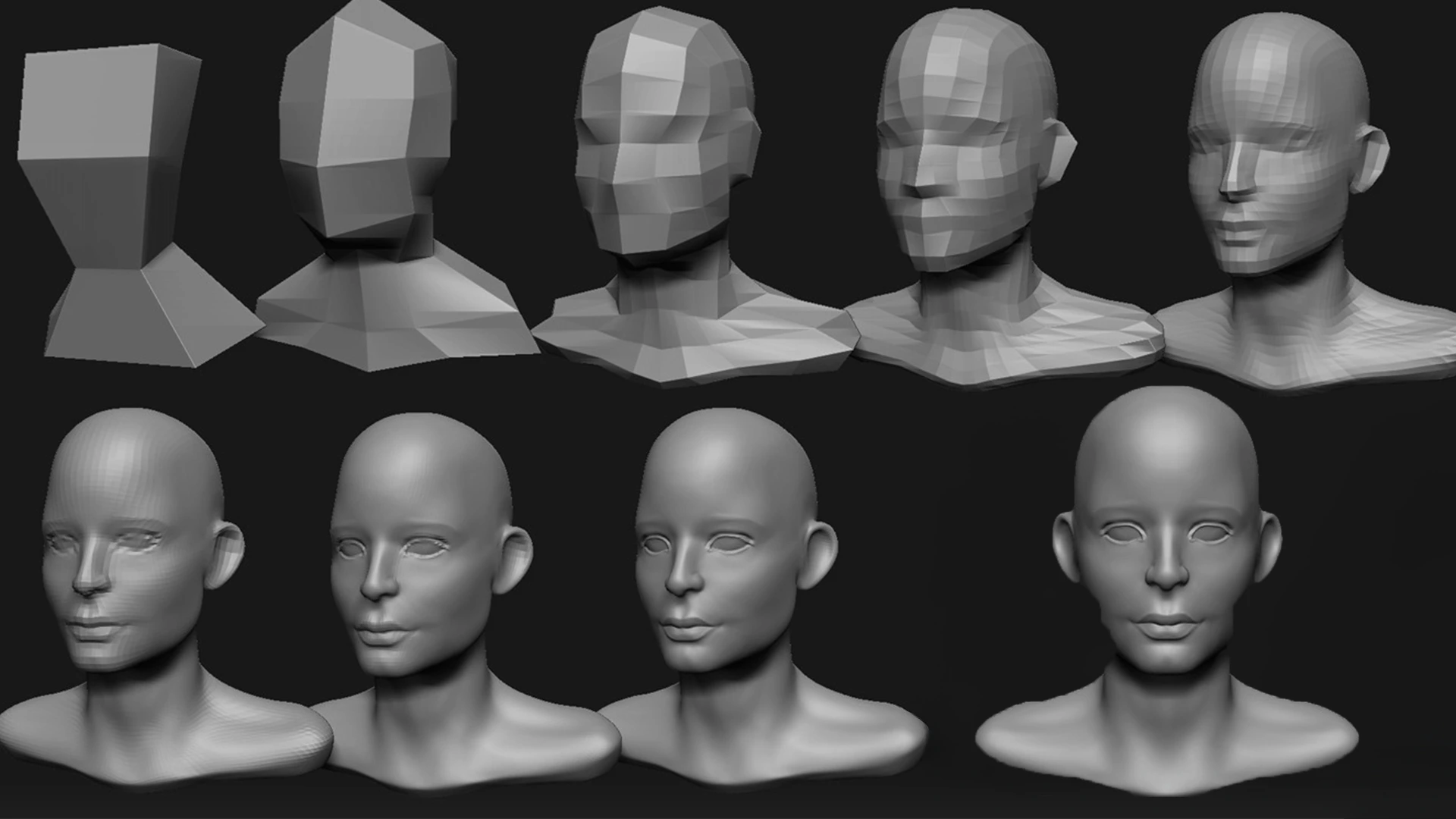
A common mistake is assuming that a model with visible detail is automatically “high-poly”. In reality, most detail in modern assets comes from textures, normal maps, and material data, not from geometry itself. Because of this, understanding how models are categorized helps ensure correct usage in games, simulations, and visualization projects.
Below is a practical overview of the most common polygon categories used in professional workflows.
These are not strict rules, but widely accepted guidelines.
Common Polygon Categories
| Category | Description |
|---|---|
| Ultra Low-Poly |
Extremely simplified models, typically under 2,000 triangles.
Used for mobile games, distant background props, or stylized art styles.
|
| Low-Poly |
Optimized real-time assets, usually between 2,000 – 15,000 triangles.
Common for environment props, open-world objects, and reusable game assets.
|
| Mid-Poly |
Moderately detailed models in the 15,000 – 50,000 triangles range.
Often used for hero props, interactable objects, or first-person assets.
|
| High-Poly |
Highly detailed geometry exceeding 50,000 triangles.
Used for cinematic rendering, sculpting, baking normal maps, and close-up shots.
|
Purpose-Based Classification
Instead of focusing purely on triangle counts, many studios classify models based on how and where they are used. The same object may exist in multiple forms across a pipeline.
| Usage | Typical Characteristics |
|---|---|
| Game Environment Prop | Low to mid poly, optimized topology, clean UVs, relies on PBR textures. |
| Hero Asset | Mid to high poly, higher texture resolution, used close to the camera. |
| Baking Source Model | High-poly sculpt with dense geometry, not intended for real-time rendering. |
| Cinematic / Visualization | High-poly geometry, high-resolution textures, minimal performance constraints. |
Why Polycount Alone Is Not Enough
Modern engines such as Unreal Engine and Unity are designed to handle large numbers of optimized assets. A well-made low-poly model with good UVs and proper normal maps can appear far more detailed than a poorly optimized high-poly mesh.
Performance is influenced not only by geometry, but also by:
- Material complexity and shader cost
- Texture resolution and memory usage
- Draw calls and instancing
- Level of Detail (LOD) setup
For this reason, professional workflows focus on balanced optimization rather than
pushing polygon counts as low or as high as possible.
Recommended Best Practices
- Design models based on their intended distance from the camera
- Use high-poly meshes primarily for baking normal maps
- Create LODs for assets used frequently in scenes
- Rely on textures and materials for fine surface detail
- Maintain clean topology and efficient UV layouts
By understanding these categories and applying them consistently, you can create assets that are visually appealing, performant, and suitable for modern real-time engines.
Comments (0)
Join the discussion with other developers.
Login to CommentNo comments yet. Be the first to share your thoughts!